
How to Build Your Own VPN
(and why you might actually want to)
Most people start looking for a VPN because something feels off.
Too many ads. Too much tracking. Too little control over where their traffic goes — and who gets to see it.
Commercial VPNs are often the obvious place to start. For many people, they’re a reasonable and convenient choice: quick to set up, widely supported, and easy to understand. But not every commercial VPN is safe, and not every commercial VPN is transparent.
This guide is for people who are curious enough to ask a different question: What if I ran my own VPN instead?
It's possible to create infrastructure you actually own and control. Whether you're an individual or a business.
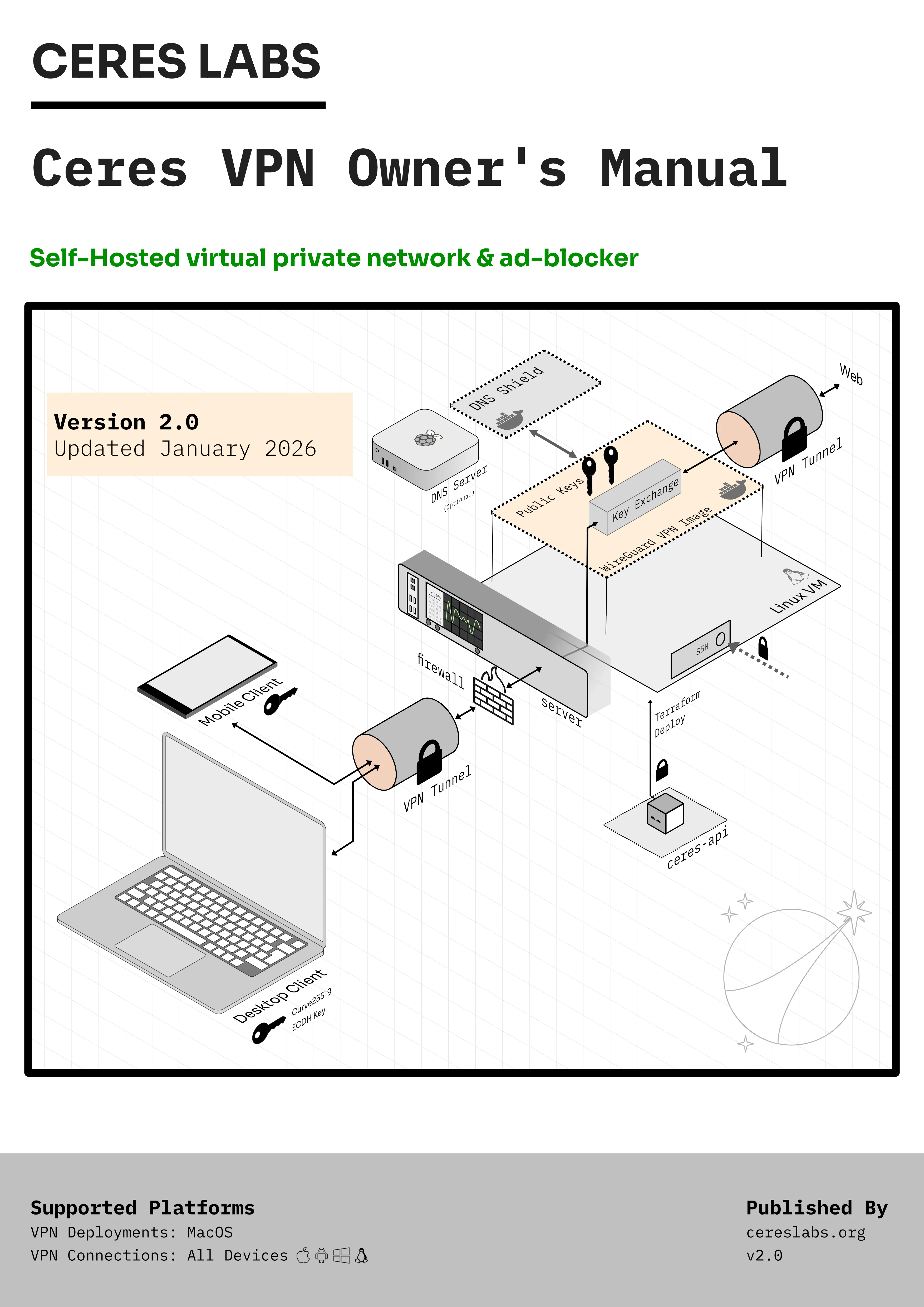
A self-hosted WireGuard VPN on a small cloud server can be simple, cheap, and reliable. It doesn’t replace commercial VPNs for every use case — but it offers a different set of trade-offs centered on ownership and control.
What “building your own VPN” actually means
Building your own VPN does not have to mean:
- Running a server in your bedroom
- Becoming a network engineer
- Writing a cryptography library
- Only using the terminal
Instead, you can:
- Rent a small virtual server from a cloud provider
- Install a modern VPN protocol (e.g. WireGuard-Easy)
- Connect your devices securely to that server, encrypting all traffic.
- Keep absolute control: all traffic and content is encrypted using keys you own.
- Optionally, add DNS filtering (to block ads / trackers, control content, and remove distractions)
One server. One owner. Maximum security and full control.
When a self-hosted VPN makes sense
This is the question most people are really asking when they search “build your own VPN”.
A self-hosted VPN does make sense if:
- You’re comfortable with basic technical concepts
- You want a clearer understanding of where your traffic goes
- You prefer owning infrastructure rather than subscribing to a service
- You want fine-grained customizability: controlling settings and content
- You like systems that are simple, inspectable, and predictable
It probably doesn’t make sense if:
- You don’t want to think about servers at all
- You value convenience above everything else
You get to choose the trade-offs you’re most comfortable with, and there's nothing stopping you from running both your own VPN and using commerical alternatives
Self-hosted VPN architecture
At a high level, the setup looks like this:
- Your own Virtual Server / VM from a cloud provider like DigitalOcean
- A private tunnel (WireGuard)
- Your devices (e.g. mac, phone, laptop)
- A DNS service -- to block ads, trackers, or specific categories of sites (optional)
- The wider internet
Nothing is pooled with other users, the architecture stays small and understandable.
Why WireGuard is a great default for self-hosting
WireGuard matters because it lowers the barrier to doing this well.
Older VPN technology tended to be:
- Heavy
- Slow
- Configuration-fragile
- Easy to misconfigure
WireGuard is:
- Small
- Auditable
- Fast
- Opinionated in a helpful way
It doesn’t try to solve every problem.
It just creates a secure tunnel and gets out of the way.
That simplicity is what makes self-hosting a realistic option rather than a hobby project. Projects like WireGuard-Easy provide users with a web interface to manage their VPN, making it even easier to set up and use.
What you need to build your own VPN
You don’t need much.
- A cloud account (DigitalOcean is a common choice)
- A computer you control
- About 10–15 minutes
- A willingness to read rather than blindly click
You do not need:
- A domain name
- A firewall appliance
- Complex networking knowledge
- Ongoing manual maintenance
Once it’s running, it tends to stay running.
High-level steps to build a self-hosted VPN
At a conceptual level, the process is:
- Create a VPS in a region you’re happy with
- Install WireGuard on it
- Generate keys (server + device)
- Configure the tunnel
- Connect your device
Optionally:
- Install a DNS service
- Route traffic through it
- Decide what you want filtered
Some guides stop here and dive straight into long command sequences.
This is where tooling can help — not by hiding what’s happening, but by making the process easier to follow and easier to undo.
Trade-offs and limitations of a self-hosted VPN
It’s worth being explicit about what this approach does not optimise for.
A self-hosted VPN:
- Does not provide ultra-anonymity
- Does not offer instant multi-country exits
- Does not remove all responsibility
What it does offer is:
- Clear ownership
- Predictable routing
- A single, inspectable trust boundary
You are the operator.
That’s the defining characteristic.
Common misconceptions
“It’s less secure than a commercial VPN.”
Security depends on what you’re comparing. One well-understood server can be simpler than a large, opaque system.
“It’s expensive.”
For many people, it costs less than a typical VPN subscription — often under $5 per month.
“It’s fragile.”
WireGuard setups are usually stable once configured. There’s very little ongoing complexity.
Where this fits in the real world
A self-hosted VPN won’t replace every privacy tool.
But it can:
- Reduce reliance on third-party infrastructure
- Make DNS filtering more effective
- Provide consistent routing on untrusted networks
- Quiet some of the background noise of everyday internet use
It’s less about suspicion, more about intentionality.
A note on Ceres VPN
If you want:
- A guided setup
- A visible mental model
- The ability to tear things down cleanly
- Optional DNS filtering without improvisation
That’s the gap Ceres VPN is designed to fill. If you want a CLI open-source tool, checkout the Wardrobe VPN github project
A beginning
The most interesting thing about self-hosting a VPN isn’t the VPN itself, it's the act of taking control of your own infrastructure and digital life.